Some parts of your site change weekly. Other parts change once a quarter. Most pipelines treat them the same.
Update modules without redeploying your site.
Packdog is a registry for the modules that ship to your live site: widgets, embeds, mini-apps, games, anything that updates more often than your main build. Scoped push access, staging channels, one-command rollback.
Free to start, no card. Pro is $29/mo when you go commercial.
What you ship
Whatever changes more often than your main build.
Packdog hosts the module-shaped parts of a site: the pieces that update on their own schedule, separate from the main app.
If the people who change a module aren't the people who own the deploy, that's the gap Packdog fills.
Widgets
A checkout, booking, or search widget dropped into a client's site.
Campaign blocks
A banner or promo the marketing team updates weekly, on its own.
Mini-apps & games
A self-contained app or game in an iframe, or a custom element on the page.
Shared web components
One reusable component several sites load, updated in a single place.
If your build makes a folder of files, it ships. Packdog doesn't care what's in it.

If any of this sounds familiar
Module shipping breaks in four predictable places.
- 01
Your two-minute fix waits two weeks
A copy tweak to your module is a two-minute job. But it rides the host app's release train, so it ships in two weeks. The people who change the module aren't the people who own the deploy, so your cadence is never your own.
- 02
You hand a consultant a GitHub branch
Now they can see your auth code, your billing logic, your half-finished next-quarter feature. You don't want to. You do it anyway because the alternative is a Slack-and-zip-file dance.
- 03
Old keys live forever
Engagements end and people move on, but the tokens they pushed with stay alive in CI variables, environment files, and laptops that left the building. Three years in, nobody can say who currently has push access.
- 04
Something ships broken at 22:00
Your last good version is a tag in a repo. Recovering it means a redeploy, cache busts, and a five-minute apology in the customer Slack.
How it works
Deploy, promote, roll back.
Versions are immutable; channels are pointers, like a Git branch where the name stays put while the commit it points at changes.
- 01
Deploy a version
Build your module to a folder and ship it to a test channel, from your laptop or your CI. Packdog tags it with the commit it came from and stores it as an immutable version. Nothing on your main site moves.
- 02
Verify, then promote
Try the new version on the test channel. When it looks good, promote it to production in one step. The channel now points at it, and browsers pick it up on their next load. No redeploy of the host site.
- 03
Roll back atomically
Every channel keeps its own history. If something breaks, step the channel back one version, in milliseconds, with no redeploy and no cache to bust.
Every step here is also a click in the panel. CLI for CI/CD, the panel for daily admin.
The dashboard
Not just a CLI. A panel for your team.
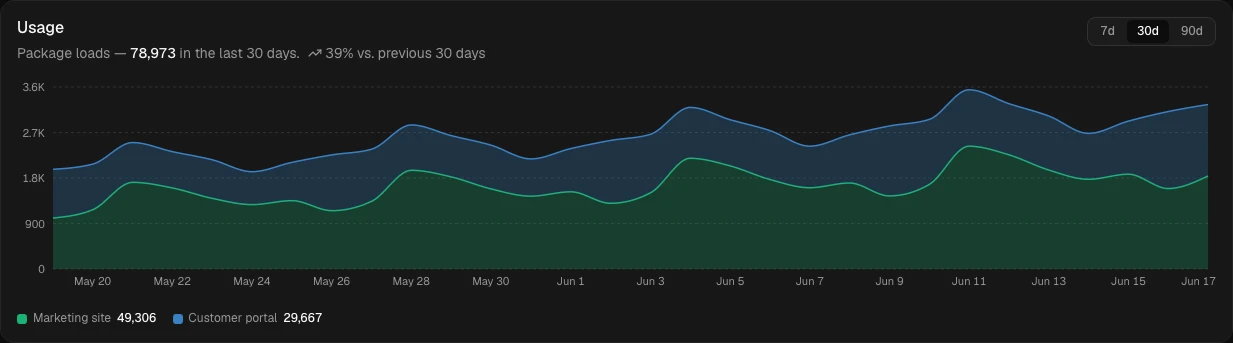
Every step is a one-liner in the CLI, and a click at app.packdog.dev. Versions, channels, rollbacks, usage, and scoped team access, all in one place.

Why not just use…
Packdog vs. the obvious alternatives.
Most teams reach for npm, GitHub Packages, or "stick it on S3 behind a CDN." Each works for something else.
| Capability | Packdog | npm | GitHub Packages | S3 / R2 + CDN |
|---|---|---|---|---|
| Update a module without a host redeploy | Yes | Rebuild + redeploy | Rebuild + redeploy | Overwrite, no rollback |
| Designed for runtime browser loading | Yes | No (build-time) | No (build-time) | Yes |
| Scoped per-project access tokens | Yes | Org-wide only | Org-wide only | No |
| Per-channel rollback history | Yes | No | No | No |
| Per-version label + source commit | Yes | Semver only | Semver only | No |
| Revoke push access in seconds | Yes | Org-level only | Org-level only | Manual key rotation |
| Usage metering per customer per package | Yes | No | No | CDN-level only |
| Immutable versions, CDN-cached forever | Yes | Yes | Yes | DIY |
| Self-service organization admin | Yes | Org settings | Org settings | DIY |
| Time to first publish | Minutes | 10 min | 30 min | 1+ day setup |
Update a module without a host redeploy
- Packdog
- Yes
- npm
- Rebuild + redeploy
- GitHub Packages
- Rebuild + redeploy
- S3 / R2 + CDN
- Overwrite, no rollback
Designed for runtime browser loading
- Packdog
- Yes
- npm
- No (build-time)
- GitHub Packages
- No (build-time)
- S3 / R2 + CDN
- Yes
Scoped per-project access tokens
- Packdog
- Yes
- npm
- Org-wide only
- GitHub Packages
- Org-wide only
- S3 / R2 + CDN
- No
Per-channel rollback history
- Packdog
- Yes
- npm
- No
- GitHub Packages
- No
- S3 / R2 + CDN
- No
Per-version label + source commit
- Packdog
- Yes
- npm
- Semver only
- GitHub Packages
- Semver only
- S3 / R2 + CDN
- No
Revoke push access in seconds
- Packdog
- Yes
- npm
- Org-level only
- GitHub Packages
- Org-level only
- S3 / R2 + CDN
- Manual key rotation
Usage metering per customer per package
- Packdog
- Yes
- npm
- No
- GitHub Packages
- No
- S3 / R2 + CDN
- CDN-level only
Immutable versions, CDN-cached forever
- Packdog
- Yes
- npm
- Yes
- GitHub Packages
- Yes
- S3 / R2 + CDN
- DIY
Self-service organization admin
- Packdog
- Yes
- npm
- Org settings
- GitHub Packages
- Org settings
- S3 / R2 + CDN
- DIY
Time to first publish
- Packdog
- Minutes
- npm
- 10 min
- GitHub Packages
- 30 min
- S3 / R2 + CDN
- 1+ day setup
What you actually get
A registry built for runtime delivery.
Ship to the live web without coupling module updates to your main deploy. Same model the platforms use for their own internals, now hosted, scoped, and metered.
Stop sharing repo access
Scoped access per project: a CI token or an invited member, never your repo. They push to staging; you promote to prod.
Revoke in one command
One CLI call. Their next push fails. Their old pushes stay tracked under their name in your audit trail.
Ship and roll back without redeploying
Push a new version, or step a channel back. One CLI call either way. No cache to bust, no main-app build to wait for, no App Store review to redo. Your release, your timing.
Pay per load, not per seat
One flat plan, then metered per 1,000 loads. Never per seat. Adding a developer costs nothing until they ship traffic.
Files served from Cloudflare's edge
Immutable URLs, cached forever. The Worker only handles metadata, so your modules load as fast as static assets.
See exactly what is being loaded
Every load is logged to Cloudflare Analytics Engine, queryable per package, per channel, per load key. Use it to bill, to attribute, or just to know.
Ship on your own clock. Roll back without a meeting.
- Free to start, no card, the whole platform
- Pro is $29/mo when you go commercial, with 1M loads included, then usage-based
- We never bill you for bandwidth: files served from Cloudflare’s edge
- Hands-on setup help from the founder, over email
- No lock-in: cancel anytime, your files are plain URLs you keep
No risk
Free to start, no card. Use it on real work, and upgrade to Pro only when you go commercial. Cancel anytime. There’s no lock-in, and your modules are plain files you keep.
No call required. Just your email, and we’ll be in touch.
Curious about cost? See the full pricing.
FAQ
Questions you're about to ask.
Is it all CLI, or is there a dashboard?
Both. The CLI (packdog) is the canonical path for automation and CI/CD. Every action is a one-liner. The customer dashboard at app.packdog.dev is the more pleasant path for daily admin: create packages, manage channels, grant project access to CI tokens and members, view activity and usage, all from the web. Same capabilities, different surface.
Why not just use GitHub Packages or npm?
Both are designed for build-time package consumption. Packdog is for runtime browser loading: you upload once, browsers fetch from the edge on every page view, and you can roll back without a redeploy. See the comparison table above for the full diff.
How is this different from micro-frontends or module federation?
It gives you the part of micro-frontends everyone actually wants, deploying and rolling back a piece on its own, without the part that hurts. Module federation exists to share dependencies across pieces, and that's where the version skew, bundle bloat, and coupling come from. Packdog skips all of it: each module is a self-contained bundle at a versioned URL, so you get independent deploys with no shared runtime to wrangle. If your pieces genuinely need to share one framework instance, you still want federation. If they're self-contained, like a widget, an embed, or a web component, you don't.
What happens if a developer pushes a broken version?
That's why channels exist. Mark prod as a protected channel; developers push freely to test, and only those you trust can promote to prod. If you've already promoted and a bug surfaces: packdog rollback --channel=prod steps back atomically. No redeploy.
How do I know which version is live?
Each channel shows the version it currently points at, and a version can carry a release label (v1.2.3) and the git commit it was built from. Set your package's repository and the dashboard links each commit straight to the source, so “what’s on prod?” is one glance, not an archaeology dig.
Can my developers push from CI?
Yes. CI tokens (ci_*) are built for exactly this: scoped machine credentials, separate from any human login. Set PACKDOG_TOKEN as a CI secret; the CLI reads it. Same one-line install (npm i -g packdog) as on a laptop. Tag each push with its commit via --commit=$GITHUB_SHA so every version traces back to the source it shipped from.
What languages or frameworks does my module need to use?
None specifically. If your build produces a directory of files, Packdog accepts it. There's no required entry filename; your site loads what it needs from the version's URL. Vite, esbuild, Rollup, plain tsc, or hand-written JS: all work. ES modules, web components, plain bundles.
Can I use it for non-UI code too, like a shared library?
Technically, yes. A version is just a versioned bundle of files at a URL. If it's a plain ES-module library, your app imports it and calls what it exports; no DOM needed. Packdog is built for modules that ship to live sites, but nothing stops you using it as a versioned, rollback-able CDN for your own code.
How are loads counted exactly?
Every successful GET /v1/packages/{id}/channels/{channel} that resolves to a version is one load. Failed auth, 404s, and 304s don't count. Logged in real-time to Cloudflare Analytics Engine, queryable from the admin API.
What does Packdog cost?
Start free: 25,000 loads a month, the whole platform, no card. Pro is $29/mo for commercial use: a million loads included, then $2 per 1,000, and we never bill you for bandwidth. Enterprise is custom. Full breakdown on the pricing page.
Where is data stored, and is this GDPR-safe?
Cloudflare D1 (metadata) and Cloudflare R2 (files), in the EU region. The load and CI keys are random tokens, not user accounts, so no customer-identifiable data is required to use Packdog itself. Human sign-ins (admins and members) are handled by WorkOS, a dedicated identity provider, so Packdog never stores passwords, and enterprise SSO/SAML/SCIM are available through it. If your modules collect user data, that's your pipeline, not Packdog's.
How does onboarding work?
Once you're approved, you're self-serve from minute one. Sign up at app.packdog.dev, name your workspace, and create a project. Install the CLI (npm i -g packdog), run packdog login, and packdog deploy your first module. It's live on a channel. Invite your developers by email; they accept, sign in, and they're in.
What happens to my modules if Packdog disappears?
The honest reassurance isn't 'trust us to be around forever'; it's that you're never locked in. Your published modules are plain files served over standard URLs, and you keep your own source, so there's no proprietary format to get trapped in. If Packdog ever went away, you'd host the files anywhere else and repoint your loader. No rewrite, no migration project. Everything runs on managed Cloudflare infrastructure under Jetbit AS, not a personal machine.
Shape what ships next.
Early customers get hands-on setup, a direct line to the founder, and real influence over what Packdog builds. That kind of attention can’t scale forever. The founding-customer phase is the time to get in.